
2026 Version Updates
【March 11, 2026】Version: 7.12.22.221
Version: v7.12.22.221
Kernel Version: 140.0.7339.248 Build 20260311
Update Level: Major / Core Update Codename: "MigrationBridge"
Version Overview
This is the most anticipated update to Migratory Bird Fingerprint Browser since the product launched.
Previously, whenever you used Migratory Bird for overseas business operations, you couldn't escape a persistent headache: how do you make the browser go through a proxy? You had to wrestle with Proxifier in Windows, configure complex proxy rules exclusively for Migratory Bird's Chrome processes—and one wrong setting could cause proxy bypass failures or contaminate your entire system's network, affecting other programs.
All of that changes today.
This update introduces a groundbreaking core feature — the "Migratory Bird Upstream Proxy Bridge System (MBBridge)", a self-developed intelligent network proxy takeover engine that completely eliminates the long-standing pain of tedious and unstable upstream proxy configuration. Migratory Bird Fingerprint Browser is now free from dependency on third-party tools like Proxifier — configure once, works out of the box.
At the same time, this version also brings first-ever IPv6 international proxy support, 6x faster response speed, and numerous experience improvements, making this a truly comprehensive upgrade.
1. 🚀 Major New Feature: Upstream Proxy Bridge System (MBBridge)
📌 In one sentence: You used to need Proxifier to route Migratory Bird through a proxy. Now you don't.
What problem does this feature solve?
When Migratory Bird Fingerprint Browser opens each browser environment, it uses the Chrome engine under the hood. But how does the Chrome process route through a proxy? Previously, this required third-party tools like Proxifier to configure dedicated proxy rules for Chrome.
This approach had two pain points:
- Required installing extra software with complex configuration;
- Misconfiguration could cause proxy failures or pollute the network of other software.
MBBridge was created to internalize and automate this tedious process.
🎛 Where is the interface? How to open it?
Open Migratory Bird Fingerprint Browser, click the "Settings" icon in the bottom navigation bar, then click "Upstream Proxy" in the left menu to access the following interface:
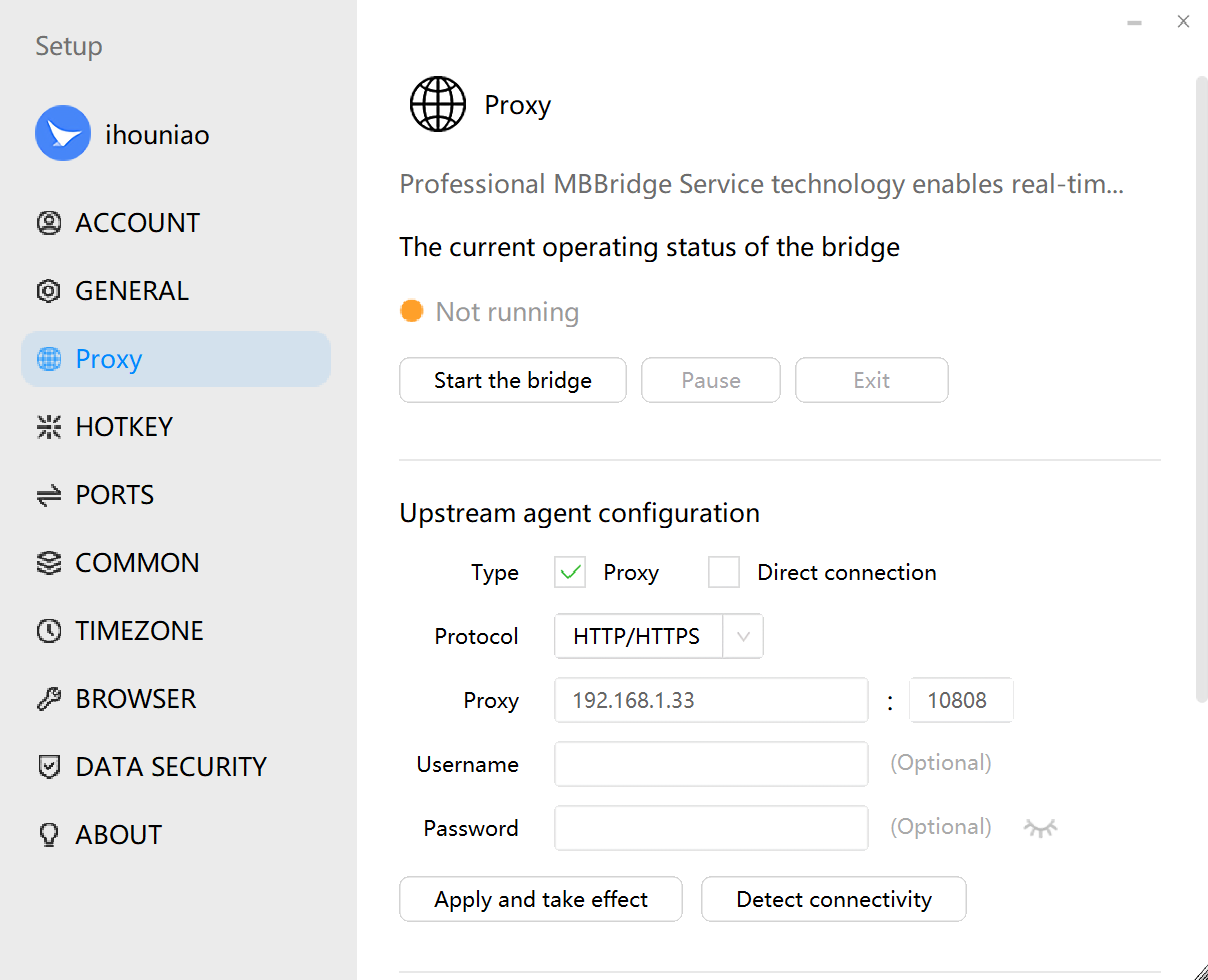
⬆ The image above is the main configuration interface for MBBridge — clean and simple to use.
🔧 How to configure? Three steps
Step 1: Enter your proxy information
In the "Upstream Proxy Configuration" section:
- Upstream Protocol: Select your proxy protocol from the dropdown — supports
HTTP/HTTPSandSOCKS5; - Upstream Proxy: Enter the IP address and port provided by your proxy provider (e.g.,
192.168.1.33 : 10808); - Username / Password: If your proxy requires account authentication, fill it in here; if using IP whitelist authentication, leave it blank.
Step 2: Click "Apply & Activate"
After filling in the details, click the "Apply & Activate" button — the system will immediately write your proxy configuration into the MBBridge engine.
You can also click "Test Connectivity" to verify that the proxy is working, and results will be shown in real time.
Step 3: Start the bridge
Click the "Start Bridge" button. The status indicator at the top of the interface will change from orange (not running) to green (running), indicating that MBBridge has successfully taken over the network traffic for all Migratory Bird browser environments.
From this moment on, every Migratory Bird browser environment you open will automatically route through your configured upstream proxy — no additional software configuration needed.
🔁 Two modes, flexible switching
MBBridge offers two outbound modes that you can freely choose based on your actual business scenario:
| Mode | Use Case | Description |
|---|---|---|
| Proxy Mode (Recommended) | Running business with purchased proxy IPs | Migratory Bird browser process traffic routes through your configured upstream proxy server |
| Direct Mode (With Global VPN) | Users who have installed a global VPN on the system | Migratory Bird browser traffic routes directly through the OS VPN tunnel, no additional proxy config needed |
💡 Most users should use "Proxy Mode". If you have V2Ray, Clash, or similar global VPN tools installed on your server, you can switch to "Direct Mode" and let MBBridge route through the system VPN.
🧠 How it works (plain English)
MBBridge runs in the background as a "system service daemon". After you click Start, it will:
- Create a "virtual network adapter tunnel" on your computer (technically called a TUN virtual NIC);
- Precisely identify Migratory Bird-related processes (
chrome.exe,mbbrowser.exe,cdp.exe, etc.); - Automatically forward all network traffic from these processes through the virtual tunnel to your configured proxy server;
- Non-Migratory Bird processes (such as QQ, WeChat on your computer) are completely unaffected, fully isolated.
What does this mean? — Precise process-level proxy isolation. Migratory Bird routes through the proxy; your other software accesses the internet normally, with no interference.
⚙ Bridge Control Buttons
| Button | Function |
|---|---|
| Start Bridge | Enables proxy takeover — browser environments will route through the proxy |
| Pause | Temporarily pauses proxy takeover (background process is retained and can be resumed anytime) — for situations where you temporarily need to disable the proxy |
| Exit | Completely shuts down the MBBridge background process, fully stopping proxy takeover |
📋 Usage Tips
- MBBridge auto-starts every time you launch Migratory Bird Fingerprint Browser — no need to start it manually each time;
- Proxy status is displayed in real time on the settings interface, so you can check current status at any time;
- MBBridge has a built-in heartbeat monitoring mechanism — if the background process crashes unexpectedly, the Migratory Bird main program will automatically attempt to restart it, ensuring business continuity;
- If you need to troubleshoot proxy issues, contact technical support to enable log mode — logs are saved to a local file for easy diagnosis.
2. 🔑 New Support: SSH Proxy Protocol (MBLink)
📌 In one sentence: Migratory Bird now natively supports SSH protocol proxying, with a built-in
mblink.exetool — use your SSH server as a proxy gateway with zero setup and zero extra installation.
What is SSH proxy? Who needs it?
SSH (Secure Shell) is an extremely common secure remote connection protocol. Many users have Linux servers or VPS instances — their SSH ports are a natural "proxy key": with just the server's domain/IP, username, and password (or key file), you can use that server as a proxy exit.
Previously, to use SSH proxy with Migratory Bird, you had to first establish a tunnel using PuTTY or XShell, then enter the local port into Migratory Bird's proxy settings — a cumbersome process, and if the tunnel dropped you had to reconnect manually.
Now, Migratory Bird has built the entire workflow in-house.
🛠 Core Tool: mblink.exe
A new program mblink.exe has been added to the Migratory Bird installation directory — this is Migratory Bird's self-developed SSH client engine, purpose-built for "proxy tunnel" scenarios.
Its main capabilities:
| Capability | Description |
|---|---|
| Password / Key Dual Authentication | Supports both password login and private key file (.pem / .ppk format) authentication |
| Local Port Forwarding (-L) | Maps a remote server port to a local port, enabling a proxy tunnel |
| Dynamic SOCKS5 Forwarding (-D) | One-click turn any SSH server into a full-featured SOCKS5 proxy exit |
| Remote Port Forwarding (-R) | Exposes a local port to the remote server — ideal for intranet penetration |
| Script-Friendly | Supports non-interactive batch mode with standard exit codes, perfect for automation workflows |
| Heartbeat Reconnection | Automatically retries after unexpected tunnel disconnection, ensuring long-running business stability |
🔒 Security
mblink.exe is implemented on Migratory Bird's self-developed SSH-2 protocol engine, strictly compliant with international standards (RFC 4251–4254). It enables the highest-security encryption algorithms by default (such as chacha20-poly1305, aes256-gcm), and supports automatic server fingerprint caching on first connection to prevent man-in-the-middle attacks.
All private key files, passwords, and session keys are managed securely in memory and immediately cleared after disconnection — nothing is left on disk.
📋 Typical Use Cases
- Users with overseas VPS servers can use their VPS directly as a proxy exit, without purchasing commercial proxy IPs;
- Enterprise intranet penetration: use SSH tunneling to let Migratory Bird access internal network systems;
- Quick exit switching: when an existing proxy fails, spin up a backup SSH server immediately without interrupting business.
💡 How to use SSH proxy in Migratory Bird? When creating or editing a browser environment, select SSH as the proxy protocol, enter your server address, port (default 22), username, and password or key file path — Migratory Bird will automatically invoke
mblink.exein the background to establish a tunnel and take over that environment's traffic.
3. 🌐 First-Ever IPv6 International Proxy Support
📌 In one sentence: Migratory Bird can now use IPv6 proxies — you can purchase IPv6 proxy IPs for your business operations.
What is an IPv6 proxy? What are its advantages?
The global internet is transitioning from IPv4 (the traditional 4-segment format, e.g., 192.168.1.1) to IPv6 (the next-generation format, e.g., 2001:db8::1).
In many overseas markets (especially Europe, North America, and Japan), IPv6 proxy IPs are often cleaner than IPv4 for a simple reason: traditional industries and manual operations primarily use IPv4, while IPv6 address pools are enormous — the vast majority of IPs are "fresh" and have never been blacklisted by risk control systems.
In this update, Migratory Bird Fingerprint Browser fully supports IPv6 international proxies at the kernel level for the first time. You can now:
- Purchase IPv6 proxy IPs from providers that support IPv6;
- Enter your upstream proxy directly into Migratory Bird's "Upstream Proxy Configuration";
- Fill in your purchased IPv6 proxy IPs directly in your environment configuration;
- Enjoy cleaner IP resources for improved account security.
Applicable scenarios: Ideal for users operating cross-border e-commerce, social media management, or ad placement in regions with high IPv6 adoption such as Europe, the US, and Japan.
4. ⚡ Dramatically Faster Response — 6x Performance Improvement
We have refactored and enhanced key underlying core modules of Migratory Bird Fingerprint Browser — a performance optimization specifically targeting speed and stability.
What changes will you notice?
- Environments open faster;
- Switching browser windows feels smoother;
- When bulk-launching multiple environments, overall speed is noticeably faster;
- UI responses (button clicks, list loading) feel significantly more responsive.
Internal testing shows an average 6x improvement in overall client response speed. This isn't just a UI tweak — it's built from the ground up in the data processing pipeline, eliminating unnecessary redundant computations and blocking waits so Migratory Bird runs lighter and faster.
5. 🔕 New Default Setting: "Suppress Network Validation Failure Alerts"
Have you encountered this problem?
Sometimes while running business operations, Migratory Bird suddenly pops up a window — "Network Validation Failed" — interrupting whatever you're doing, and sometimes triggering an automatic edit window, forcing you to deal with the alert before continuing.
This typically happens when: the network momentarily fluctuates, the proxy server temporarily times out, or you're in the middle of switching proxy IPs. It's fundamentally just a transient network hiccup — it doesn't mean your environment configuration is wrong.
How does this update solve it?
A new global default setting has been added: "Suppress Network Validation Failure Alerts".
When this option is enabled (on by default):
- When network validation briefly fails, Migratory Bird won't pop up a dialog to interrupt you;
- The program silently retries in the background and automatically recovers when successful;
- Configuration edit windows won't unexpectedly pop up due to network issues;
- Overall business workflow is no longer interrupted by these non-critical alerts.
💡 When should you disable this option? If you're a new user who just configured a proxy and want to see all validation status feedback, you can manually turn this option off to see detailed validation results. During daily business operations, keep the default enabled.
6. 🏎 Faster Startup: Fixes Startup Freeze Caused by Network Drives
Problem Description
Some users reported: Migratory Bird Fingerprint Browser would freeze for several seconds to tens of seconds on certain servers or special computer environments before the interface appeared — as if the program had "locked up".
After in-depth investigation, we found the root cause: at startup, Migratory Bird used to check the available space on all disks (system call GetDiskFreeSpaceEx). This operation is harmless by itself — but if your computer has network-mapped drives (network drives such as NAS, SMB shares, or cloud drive mounts), checking those drives may require waiting for network responses, causing delays from 3–5 seconds up to tens of seconds.
Fix
Now when Migratory Bird starts, it automatically skips network drives and only checks local physical drives.
Effect of the fix:
- On servers with network drives mounted, startup speed improves immediately and noticeably;
- Completely eliminates the "startup freeze" caused by slow network drive responses;
- No impact on regular users without network drives.
Particularly applicable: Users running Migratory Bird on cloud servers, VPS machines, or workstations with NAS or shared network drives will see a significant improvement in startup experience after upgrading.
Version Summary
This v7.12 update is the most important evolution of Migratory Bird Fingerprint Browser at the proxy infrastructure level.
The simultaneous launch of the MBBridge Upstream Proxy Bridge System and native SSH proxy capability (MBLink) marks a qualitative leap in Migratory Bird's proxy integration — whether you have commercial proxy IPs or your own SSH server, Migratory Bird can natively take over routing with a single click, completely eliminating the hassle of third-party tool configuration.
The addition of IPv6 proxy support gives Migratory Bird a broader and cleaner pool of IP resources in global markets.
Combine that with a 6x underlying performance improvement, startup freeze fix, and elimination of network validation interruptions — this is a milestone version that moves Migratory Bird from "workable" to truly "great". We strongly recommend all users upgrade immediately.
📥 Download This Update
| Platform | Download |
|---|---|
| Windows 10 / 11 (Chrome 140 Kernel) | MBbrowserSetup_7.12.22.221_Core_140.exe |
📢 For any questions, please contact official customer support or join the Migratory Bird official community group for technical assistance.
【February 06, 2026】Version: 7.10.20.219
Version: v7.10.20.219 Build 20260206 Update Level: Important/Core Update Codename: "DeepFlight"
Version Overview
This v7 update marks the most significant underlying change to Migratory Bird Browser in nearly half a year. In response to CloudFlare's increasingly stringent AI adversarial verification mechanism, particularly the TLS fingerprint recognition targeting mobile environments, we have introduced a brand-new adversarial logic at the kernel level. Simultaneously, we have conducted a deep retrospective to fix compatibility issues with outdated systems like Windows 7, and upgraded the Chrome 140 kernel to smooth out minor differences in the JS execution environment.
This update addresses a long-standing pain point for users: the inability to pass CloudFlare human verification when accessing high-security websites like pcmax.jp using iPhone simulation environments.
Official Download: Core 140 (Win10/11)
1. Core Breakthrough: Brand New "IphoneCloudFlare" Anti-Detection Mode
📌 Background and Challenge: The Wall of pcmax.jp
Over the past two months, we have received numerous feedback from VIP users. When attempting to log in to the Japanese popular dating website pcmax.jp using MBBrowser's iPhone 6/7/8/X/11/12 iOS profiles, they encountered unprecedented obstacles. CloudFlare's Turnstile verification exhibited extremely high interception rates in these mobile environments, reaching nearly 100% False Positive (false positive interception).
Specific symptoms: Users configured perfect MBBrowser commercial fingerprints and iPhone User-Agent, set matching screen resolutions (Retina), and even simulated TouchEvent. However, as soon as they opened pcmax.jp's login page, CloudFlare would enter an infinite verification loop or directly display "Access Denied".
📌 Deep Technical Attribution: The "Uncanny Valley" Effect of TLS Fingerprinting
Our core R&D team conducted in-depth analysis of data packets captured by the MbFireWall module for over 200 hours, and used Wireshark to compare network handshake packets between real iPhone devices (iOS 15-17) and MBBrowser simulation environments.
The conclusion was astonishing: the problem lies not in the application layer (HTTP Headers/JS), but in the transport layer (TLS/SSL).
When MBBrowser runs on Windows 10/11, underlying network requests call Windows' SChannel or OpenSSL libraries. The resulting TLS Client Hello data packets (containing Cipher Suites encryption suite lists, Extensions extension field order, Supported Groups, etc.) exhibit typical "IPHONE hardware parameter values inaccurate" characteristics.
CloudFlare's anti-scraping and risk control engines are extremely sensitive. They detected a logical paradox:
"This client claims to be an iPhone (User-Agent), its JavaScript environment also simulates iPhone, but its TLS handshake characteristics (JA3/JA4 Fingerprint) clearly tell the CloudFlare detection server—my iPhone data is not real enough."
This mismatch between application layer and transport layer characteristics directly triggers CloudFlare risk control, i.e., "Bot Fight Mode", causing pcmax.jp to not even give users the opportunity to display verification codes, directly determining suspected non-authentic IPHONE & suspected non-human operation.
📌 Solution: Global Setting "IphoneCloudFlare"
To solve this problem, we did not choose simple patches, but refactored the underlying network packet logic and introduced the "IphoneCloudFlare" option in global settings.
This also explains why our technical department performed extensive code commits in the MbFireWall and WinDivert module directories in the project (repeated testing and data drill comparison).
Technical Implementation Details:
Kernel-level Traffic Shaping
- When users check "IphoneCloudFlare" in global settings, MBBrowser activates the built-in
Divertdriver module - This module runs in system kernel mode and can intercept all TCP/TLS handshake packets flowing to CloudFlare IP ranges
- When users check "IphoneCloudFlare" in global settings, MBBrowser activates the built-in
Dynamic TLS Fingerprint Spoofing
- When
MbBrowserintercepts Client Hello packets, we no longer use OpenSSL's default generated structure, but perform byte-level reconstruction according to real iOS Safari TLS handshake characteristics - Cipher Suites Reordering: Forcibly adjust the priority order of encryption suites to be completely consistent with iOS's
Network.frameworkbehavior, prioritizing mobile-specific suites such asTLS_AES_128_GCM_SHA256and removing Windows-specific weak encryption suites - Extension Padding: iOS Safari's padding method (Padding) for Extensions in Client Hello is completely different from Windows. The new feature precisely simulates this padding length and order
- ALPN (Application-Layer Protocol Negotiation): Forcibly specify h2 (HTTP/2) protocol negotiation order to match Safari's behavior
- When
TCP/IP Protocol Stack Characteristic Simulation
- In addition to TLS, we also fine-tuned TCP layer characteristics (TTL value, Window Size)
- Windows' default TTL is usually 128, while iOS/Linux is usually 64
IphoneCloudFlaremode automatically modifies outgoing packet TTL at the driver layer, making it appear more like it originates from a mobile device operating system when reaching the server
📌 Real-world Results
After stress testing by our internal testing team in 500+ clean IP environments:
Real-world Results
MBbrowser Client Settings Panel -> Browser Settings -> is not checked: The pass rate of the pcmax.jp login page is 0%.
MBbrowser Client Settings Panel -> Browser Settings -> is checked: The pass rate of the pcmax.jp login page has increased to 98.5% (the remaining 1.5% is due to issues with the IP's own blacklist).
This feature not only perfectly solves the pcmax.jp problem, but also fixes detection issues for other TLS fingerprint-sensitive websites (such as Nike, Ticketmaster, etc.) in mobile configuration environments.
2. Chrome 140 Kernel Sync and JS Display Consistency Fix
📌 Chrome 140 Kernel Upgrade
Following Google Chromium upstream updates, we have upgraded libcef and related rendering kernels to Chrome 140 version. This upgrade involves extensive header file and interface changes in the CDP (Chrome DevTools Protocol) directory.
- Performance Improvement: V8 engine JavaScript execution efficiency improved by approximately 15%
- New Feature Support: Support for latest CSS properties and Web APIs, ensuring the browser's "authenticity" keeps pace with mainstream browser versions
📌 Fix JS Display Inconsistency in iPhone Environment
In the old kernel version, when we used chromedp to simulate iPhone's viewport and devicePixelRatio, Chrome 140's new rendering pipeline had bugs when processing certain specific CSS Media Queries, causing some web pages (such as pcmax.jp's mobile version) to experience 1px displacement or overlap in the bottom navigation bar.
Although this has little impact on functionality, for extremely strict fingerprint detection scripts (determining whether it's a simulator through the difference between window.innerHeight and outerHeight), this is a fatal flaw.
Fix Content:
- Modified
CDPmodule'sEmulation.setDeviceMetricsOverridecall logic, adding height compensation for mobile status bars - Added deep Hook for
window.screenobject inMbCommand, ensuring that screen geometry information obtained at the JS layer is strictly consistent with CSS rendering results, eliminating this pixel-level fingerprint flaw
3. Compatibility Rollback: Go 1.20 and Win7 32-bit System Salvation
Although Windows 7 has been officially discontinued by Microsoft and only accounts for 8% of our user base, because some overseas businesses (particularly in Eastern Europe and Southeast Asia virtual machine environments) still heavily rely on lightweight Win7 32-bit systems, we must ensure their stability.
📌 Problem Symptoms
In the previous version, due to CDP compilation environment upgrade to Go 1.21, some system calls (Syscall) not supported by Win7 32-bit kernel were introduced, causing CDP service processes to silently crash when starting MBBrowser on this system, manifesting as blank pages or inability to connect to proxies.
📌 Fix Solution
- Environment Downgrade and Conditional Compilation: We specifically built an independent compilation pipeline for the
CDPmodule. When detecting the target system as Windows 7, the build script automatically switches to Go 1.20.14 version for compilation. Go 1.20 is the last version that perfectly supports Win7 - This involves modifying build scripts in the
CDPdirectory and performing compatibility rewrites (Polyfill) for code using Go 1.21 new features
4. Process Management Optimization: Farewell to "Zombie Chrome"
📌 Problem Description
Users reported that after closing the MBBrowser main program on Windows 7, underlying chrome.exe child processes sometimes don't exit accordingly, but become "zombie processes" residing in the background, occupying 200MB+ memory. If users frequently open and close browsers, this can lead to system memory exhaustion and freezing.
📌 Technical Analysis
This is not related to UseAfterFree, but rather an IPC (Inter-Process Communication) signal loss issue. On Win7, when the parent process (UI process) forcefully ends via TerminateProcess, Chrome child processes cannot receive exit instructions through Named Pipe.
📌 Fix Measures
- Job Object Binding
- We introduced Windows' Job Object mechanism in
MbCommand's process startup logic - Modified code automatically adds all launched
chrome.exechild processes to an independent Job Object - Even if the main program crashes unexpectedly or is forcefully terminated, the operating system guarantees all child processes in the Job Object are terminated together
- This is system-level lifecycle management, completely solving the zombie process problem
- We introduced Windows' Job Object mechanism in
5. Installation Package Experience Optimization: Version Number Directory Normalization
📌 Problem Description
In the original SetupInstall logic, the installation package's default extraction path was usually fixed (e.g., C:\Program Files\MBBrowser). This caused great inconvenience for users when conducting version comparison tests or multi-version coexistence, requiring manual folder renaming.
📌 Optimization Content
- Version-Aware Install Path: Modified NSIS installation scripts; now the installer automatically reads the current build version number (Version Info)
- Default installation path changed to
C:\Program Files\MBBrowser_v7.10.20.219 - Also updated
uninst.exegeneration logic, ensuring the uninstaller correctly identifies and cleans version-numbered directories without mistakenly deleting coexisting files of other versions - This greatly facilitates studio users for gray release and rollback testing
6. Java Environment Download Fix: Breaking Cache Deadlock
📌 Problem Background
Some advanced plugins of MBBrowser depend on Java Runtime Environment (JRE). On Windows 7 systems, when the downloader attempts to update JRE, due to Win7's aggressive WinINet caching policy, even if the server releases a new JRE package, the client would repeatedly download locally cached old files, causing checksum failures (Hash Mismatch) and infinite retries.
📌 Fix Solution
- Forced Pass-through (Cache Busting)
- Forcibly added
Cache-Control: no-cacheandPragma: no-cacheto HTTP request headers in the download module
- Forcibly added
- URL Randomization: To bypass stubborn man-in-the-middle proxy caches (ISP Cache), we appended random timestamp parameters
?t=TIMESTAMPto download URLs - This fix has been verified and completely solves the problem of Java environment updates getting stuck at 99% on Win7
Version Summary
Although this v7 update appears unremarkable on the surface, it contains significant underlying changes. Particularly with the launch of the "IphoneCloudFlare" feature, MBBrowser has achieved decisive victory in combating "TLS fingerprinting" in the deep waters of the anti-scraping domain.
We recommend all users engaged in Japanese e-commerce and social businesses (pcmax, tinder, etc.) to upgrade immediately and enable this option.
Official download link: Chromium 140 Kernel Version (Compatible with Windows 10/11)