
MBAgent - Mbbrowser - Enterprise AI Assistant: One Sentence, Let AI Work for You
Imagine this scenario —
"Help me organize yesterday's order count for these 50 Amazon stores into an Excel sheet, marking stores with sales below 10 in red."
Previously you would: log in to 50 environments → open order pages → copy data → paste Excel → mark colors, a 2-hour ordeal.
Now you only need to say this one sentence in MBAgent, then watch it complete step by step. This is the entire meaning of MBAgent's existence: turn "repetitive labor" into "one sentence".
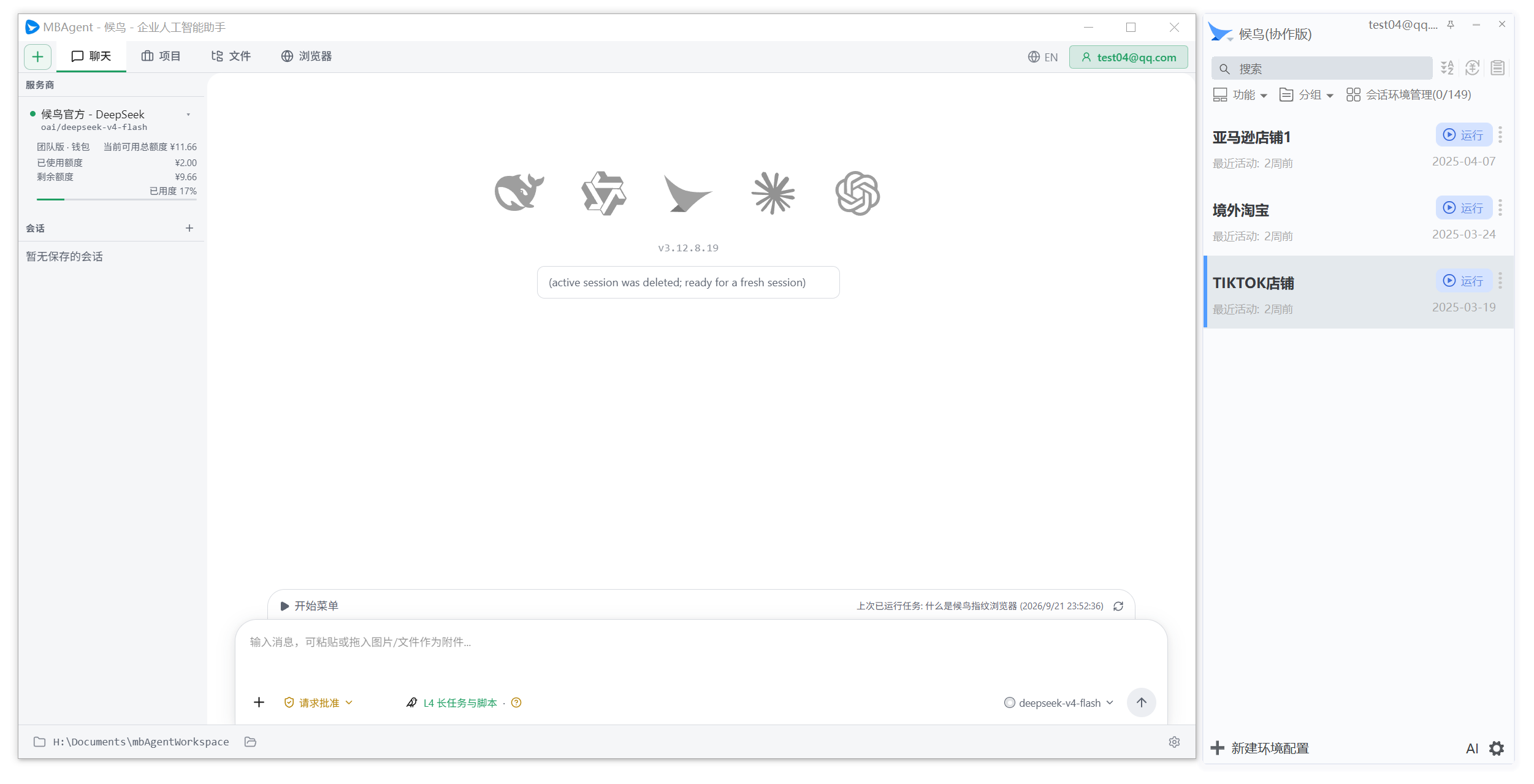
NOTE
Screenshot description: The above image shows the overall layout after launching MBAgent. The follow-up article Download, Installation and First Launch has a full-screen screenshot with the same annotation in the "First Launch" section, here specifically reflecting MBAgent's overall vibe.
What Can This Section Help You With?
This section has 15 articles in order "from shallow to deep", explaining every feature of MBAgent clearly. You don't need any programming foundation; you only need to be able to describe what you want to do in Chinese.
Recommended Reading Order
Step 1 → [Section Intro: What is MBAgent](./index)             ← You are here
Step 2 → [Download, Installation and First Launch](./install-and-start)     ← Install MBAgent
Step 3 → [First Time Using MBAgent](./first-time-use)          ← Run your first task
Step 4 → [What MBAgent Can Do](./what-can-do)           ← Discover its capability boundaries
Step 5 → [Model Selection & Provider Setup](./model-and-provider) ← Make AI smarter
Step 6 → [Task Panel Explained](./task-panel)                     ← Decomposition and execution of complex tasks
Step 7 → [Full Feature Menu Overview](./menu-overview)                ← All feature entries
Step 8 → [Settings Overview](./settings-overview)                  ← Personalize your MBAgent
Step 9 → [AI Memory Bank Usage](./memory-bank)                 ← Let AI remember your preferences
Step 10 → [Mbbrowser ControlV2 Integration](./browser-control)       ← Connect MBAgent and Mbbrowser
Step 11 → [Permission Management & Safe Usage](./permission-and-safety)   ← Let AI work with peace of mind
Step 12 → [Start Menu Tasks](./start-menu-task)               ← Save frequent tasks as buttons
Step 13 → [Scheduled Tasks & Loops](./schedule-and-loop)           ← Let AI work automatically on schedule
Step 14 → [Tips & Best Practices](./tips-and-best-practice)   ← Veteran user experience summary
Step 15 → [FAQ](./faq)                           ← Check here first when problems arise
What Is MBAgent?
MBAgent is the official companion AI assistant for Mbbrowser, running on your own computer. It understands natural language, breaks down what you want to do into steps, calls suitable AI models and tools to help you complete it.
The difference between it and "ordinary AI chat windows":
| Ordinary AI Chat | MBAgent |
|---|---|
| Can only answer questions, generate text | Truly can take action: operate browsers, read/write files, execute commands |
| Model doesn't know which Mbbrowser accounts you have | Directly connects to Mbbrowser, operates in your real environments |
| Need to re-explain background each time | Has memory, remembers your preferences and historical tasks |
| Cannot directly operate multi-accounts | Supports multi-account switching, each account independently isolated |
TIP
One sentence to understand MBAgent: It is an AI employee inside your computer — it understands what you say, operates Mbbrowser, reads and writes files, and can keep working on schedule after you leave for the day.
NOTE
Screenshot description: Actual screenshots of the "dual control" interface when MBAgent and Mbbrowser run simultaneously (Mbbrowser main window + MBAgent main window side-by-side) will be progressively supplemented in v1.x. You can first refer to the schematic "Relationship between MBAgent and Mbbrowser" below.
Relationship Between MBAgent and Mbbrowser
Many users first encountering MBAgent ask: "What is its relationship with Mbbrowser?"
The answer is very simple —
- Manage account environments
- Launch browser
- Set fingerprint
- Proxy network
- Save cookies
- Understand natural language
- Decompose task steps
- Call AI models
- Operate browser environments
- Organize documents and data
Specific division of labor:
- Mbbrowser handles "action": All "operation-level" things — accounts, browser instances, proxy, fingerprint, opening and closing pages — are fully handled by Mbbrowser.
- MBAgent handles "thinking": Understands what you say, splits big tasks into small steps, decides which tools to use, and finally organizes the results for you.
- The two share account connection: The account you log in to in Mbbrowser is auto-available to MBAgent, no need to log in again.
IMPORTANT
MBAgent does not bypass Mbbrowser to operate webpages directly. All browser-related operations must execute through Mbbrowser environments, meaning all your account's fingerprint isolation, proxy settings, cookie isolation and other security policies remain fully effective.
What Can MBAgent Help You Do?
MBAgent's application range is very broad; common ones include:
1. Daily Office and Document Processing
- 📄 Organize materials: Classify scattered documents, Excel, images, aggregate them into reports in specified format
- 📝 Draft documents: Draft emails, reports, contracts, product descriptions based on the materials you provide
- 🔍 Extract information: Extract key info (order numbers, prices, names, phone numbers, etc.) from massive documents and output structurally
- 🌐 Translate content: Translate foreign documents and webpage content into Chinese
2. Mbbrowser-Related Operations
- 🛒 Batch operations: Execute the same web operations in multiple account environments (collect data, publish products, check orders)
- 🔐 Account patrol: Auto-check account login status, fingerprint consistency, cookie integrity
- 📊 Data collection: Collect public data from e-commerce sites, social media, backend systems
- 🧪 Environment testing: New environments auto-run a login test to confirm no fingerprint leakage
3. Repetitive Long-Term Tasks
- ⏰ Scheduled tasks: Auto-generate yesterday's data report every morning at 9
- 🔁 Loop monitoring: Check store inventory every 30 minutes, notify you when below threshold
- 📦 Batch publish: Publish one product info to 10 stores at once
4. Ad-hoc Complex Tasks
- 🛠️ Troubleshooting: Throw an exception screenshot to MBAgent, let it help you analyze the cause
- 📚 Learn new platforms: Ask MBAgent "how to open a store on XXX site", it teaches you step by step
- 💡 Creative work: Write copy, make graphics, brainstorm names, slogans
A Typical Usage Flow
[Step 1] Launch MBAgent
   ↓
   Your computer already has Mbbrowser installed and logged into an account
   Double-click the MBAgent desktop icon to launch

[Step 2] Tell your need in Chinese
   ↓
   "Help me organize today's order count for 20 stores into a sheet"

[Step 3] MBAgent analyzes the task
   ↓
   It auto-decides: need to connect Mbbrowser → open 20 environments →
   log into backend → collect order data → write to Excel

[Step 4] You can intervene during the process
   ↓
   • Pause / resume task
   • Modify AI's next step action
   • Skip a certain environment (already confirmed it has issues)

[Step 5] View result
   ↓
   Sheet is generated on desktop / your specified folder,
   MBAgent also gives you an execution summary:
   "Of the 20 accounts, 18 succeeded, 2 incomplete due to IP anomaly"
Core Features of MBAgent
1. Complete Work Using Natural Language
No commands to remember. Just talk: "Aggregate this order sheet, sort by amount, mark amounts > 1000 in red."
2. Supports Multiple AI Models
MBAgent itself is not model-locked — you can use Mbbrowser official models, OpenAI, Claude, Gemini, DeepSeek, or hook up a custom gateway or local model. Model choice is entirely yours.
3. Truly Can Invoke Tools
With authorization, MBAgent can:
- Read/write files on your computer
- Open / operate environments inside Mbbrowser
- Execute command-line commands (subject to permission limits)
- Search local knowledge base
- Query public materials online
4. Has Memory Capability
MBAgent distinguishes two kinds of memory:
- Session-level memory: Context within current conversation, ask "that number just now" it remembers
- Long-term memory (AI memory bank): Preserves your explicitly saved preferences and knowledge across sessions
5. Values Permission and Security
Sensitive operations (delete files, execute commands, operate accounts) all need your authorization. You can set three types of permissions:
- Auto execute: Harmless operations do directly (e.g. query, read)
- Needs confirm: Let you confirm before each execution (e.g. modify file)
- Forbidden execute: Completely disallowed (e.g. delete environment)
TIP
MBAgent is not a tool to replace your judgment. Operations involving account login, data submission, file deletion, it will pause for your confirmation; you are also recommended to double-check the final result.
Do I Need a Programming Background?
No, not at all.
MBAgent's original design intent is to let non-programmers also direct AI to work. You only need:
- ✅ Be able to describe what you want to do in Chinese
- ✅ Be able to use Mbbrowser's basic functions (create environments, log into accounts)
- ❌ Don't need to know Python / JavaScript / any code
If your needs are complex (multi-step, cross-tool), MBAgent will auto-decompose the task; you only need to watch it work, intervening to confirm when necessary.
Get Started
Next: Download, Installation and First Launch →
NOTE
Haven't installed MBAgent yet? Please first go to the Mbbrowser download page to download the latest installer. MBAgent is bundled with the Mbbrowser installer; no separate download needed.