
Mbbrowser Version Updates
【September 21, 2026】Version: 9.18.58.198
Version: v9.18.58.198
Kernel Version: 140.0.7339.248 Build 20260921
Update Level: Major / Strategic Update Codename: "ApexCortex"
Version Overview
If v8's ControlMatrix made "managing hundreds of environments at once" a standard Mbbrowser capability, this ApexCortex release answers a more fundamental question: when your workflow is more than just "open a browser and click around," can Mbbrowser help you truly "think + work"?
Over the past three years, Mbbrowser has been solving three things: account security, fingerprint stability, and large-scale environment management. From v7.10 (IphoneCloudFlare), v7.12 (MBBridge + MBLink), to v8.12 (ControlMatrix), every major release reshaped some underlying layer of multi-account operations. Today, v9.18.58.198 marks the first time Mbbrowser officially steps beyond being a browser tool into becoming an AI collaborative workspace.
mbAgent debuts.
It is a local AI agent natively co-existing with Mbbrowser, specialized in "web pages + Mbbrowser + multi-account scenarios." It is neither a simple ChatGPT wrapper nor yet another browser automation engine. Instead, it takes the fingerprint, proxy, environment, CDP, Control V2 protocol, and dual-controller capabilities Mbbrowser has built over the years and hands them in full to AI — AI can now directly command Mbbrowser to open any environment, log into any account, and execute any web task, all while respecting Mbbrowser's security boundaries, audit logs, and token quota management.
Alongside mbAgent, an officially certified web automation engine — browser-auto (Mbbrowser Web Automation Engine) — ships built-in. It is a hardened independent EXE subprocess adapted by the Mbbrowser team on top of the mature upstream browser-use engine, purpose-built for complex cross-border e-commerce pages (registration, multi-step forms, dynamic captchas, login redirects, submission sending).
Around the debut of mbAgent, the mbbrowser client, ApiServer controller, Cookie governance, and official AI model channels have all completed a strategic-level upgrade:
- mbbrowser (Mbbrowser Client) — The Control V2 server side has been fully rewritten to dual controllers, officially carrying mbAgent connections; Cookie expiry reminder email service has been added; multi-window interaction details have been polished throughout.
- ApiServer — All 144 historical HTTP endpoints have been migrated to Control V2, sharing the same capability spec with mbAgent; once mbAgent is started, both controllers can be used simultaneously.
- Multi-LLM Official Channels — Three categories of officially certified models (DeepSeek / Claude / GPT) automatically unlock based on your Mbbrowser membership tier, billed and audited through Mbbrowser's own NEWAPI relay station.
We recommend that all users engaged in cross-border e-commerce, multi-account matrices, ad placement, e-commerce store operations, and social media traffic operations upgrade immediately after reading this announcement — v9.18.58.198 is the starting point of Mbbrowser's transition from a "tool product" to an "AI workspace."
1. 🧭 Major Debut: mbAgent — Mbbrowser's Native AI Agent
📌 In one sentence: From today, the Mbbrowser client ships with a local AI assistant for cross-border e-commerce scenarios. You can tell it directly in plain language "fetch all today's new messages from pcmax.jp in this environment," and it will complete every step automatically.
What problem does this feature solve?
Anyone in cross-border business knows that "whether AI can truly help us work" has always been an awkward question:
- Generic ChatGPT / Claude web versions: Accounts live in the cloud, can't reach your Mbbrowser environments, and certainly can't use them to operate fingerprint-protected real business sites like pcmax, TikTok, or Shopee.
- So-called "AI browsers" on the market: Run in parallel with Mbbrowser and conflict with Mbbrowser's fingerprint, proxy, Cookie, and pipeline; they can't manage your Mbbrowser profiles.
- Writing your own scripts: Login, captcha, two-factor, page changes... each item can take a full day to debug.
mbAgent is the first AI agent natively running inside the Mbbrowser client. Its arrival is not meant to replace Mbbrowser's existing browser experience, but to upgrade it one layer: turning the Mbbrowser browser into an intelligent execution unit that AI can command, supervise, and summarize.
A standard mbAgent workflow is: you give a goal → mbAgent picks an environment → attaches to Mbbrowser Chromium → executes the complex page task → returns the process and result to you.
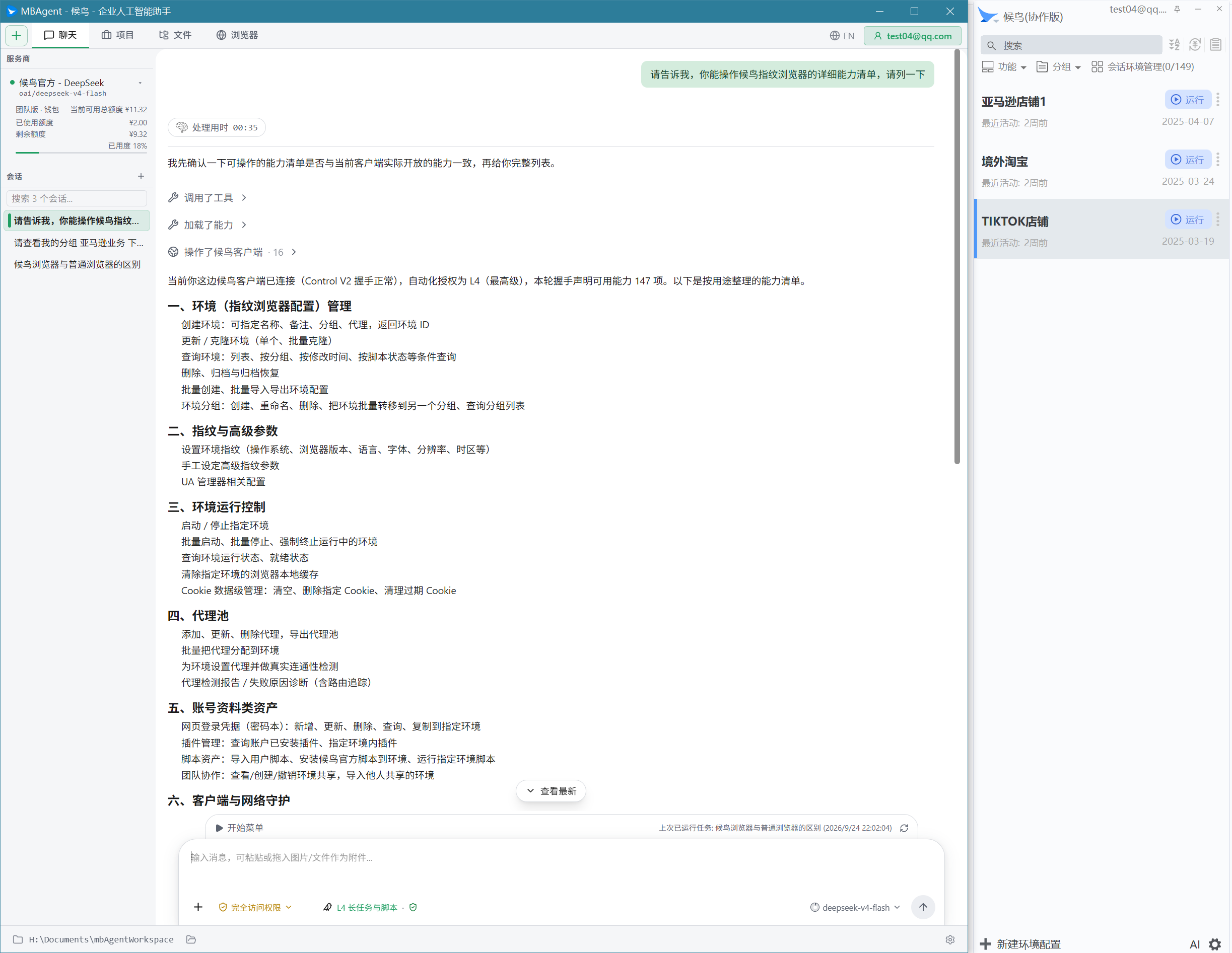
What can mbAgent do for you?
mbAgent ships with 130+ preset task templates (see Section 4 for details), covering the full cross-border e-commerce scenario set. At the same time, you can describe new tasks freely in natural language; mbAgent will automatically decompose, plan, and execute them directly through your Mbbrowser environments.
Typical scenarios:
- "Check whether all 200 store accounts today have any abnormal login regions" — mbAgent traverses environments, checks proxy exit IPs, compares historical fingerprints, and generates a report.
- "Log into pcmax.jp in the current environment and organize all unread messages into Excel" — mbAgent attaches to the environment you opened, and completes the flow step by step under your Mbbrowser identity.
- "The Product Description format on this Amazon seller page is messy. Rewrite all products using a unified template and save locally" — mbAgent opens the page, extracts structure, rewrites per your template, writes the file.
- "Before 9 PM tonight, automatically open 50 environments, visit a website in sequence, each staying for 30 seconds" — mbAgent starts 50 environments through Mbbrowser Control V2 and executes them in order.
How does it do all this? — Its relationship with Mbbrowser
This is the most fundamental difference between mbAgent and every "AI browser" / "AI assistant" on the market.
User
  ↓ Natural language task description
mbAgent main agent (Rust local process)
  ↓ Calls "published" operations in the Mbbrowser spec
Mbbrowser (mbbrowser.exe)
  ↓ Control V2 protocol / environments started and managed
Mbbrowser Chromium 140
  ↓ Candidate attach + automation lease
Mbbrowser CDP (WebSocket)
  ↑ Page state, proxy exit, Cookie values, cross-origin frames
browser-auto (Mbbrowser Web Automation Engine, independent EXE)
  ↑ Model loop: observe → decide → act → verify → recover
LLM (DeepSeek / Claude / GPT, per membership channel)
mbAgent does not invoke LLM in the cloud to operate an independent Chrome. Instead, it:
- Discovers and connects to the Mbbrowser client already logged in on your machine (validated via triple-check: Control V2 + discovery token + PID creation time);
- Selects available environments per Mbbrowser profiles, verifying each environment's fingerprint / proxy / Cookie / previous state;
- Attaches to the real CDP WebSocket of Mbbrowser Chromium (does not create profiles, does not modify fingerprints, does not switch proxies);
- Calls "published" operations in the Mbbrowser official spec (144 historical HTTP endpoints + 4 ApiServer local management endpoints, all over Control V2 persistent TCP);
- Uses Mbbrowser's AutomationLease to seamlessly hand off to human takeover — you can take over the environment mbAgent is operating at any time; it will automatically yield control.
This means: mbAgent never bypasses any Mbbrowser security mechanism, and never touches your fingerprint / Cookie / proxy. It simply lends Mbbrowser's capabilities to AI.
2. 🚀 Brand-New Independent Engine: browser-auto (Mbbrowser Web Automation Engine)
📌 In one sentence: browser-auto is the "engine" behind mbAgent — an independent EXE subprocess purpose-built for complex web tasks.
Why does it need to be an independent engine?
The mbAgent main agent (Rust) excels at scheduling, spec validation, capability discovery, and audit, but it is not good at "looking at a web page and making decisions." To make AI operate real websites like a human, you need a complete, mature, observable web agent loop:
observe (DOM / screenshot / control tree)
  → model_decide (LLM decides the next action)
  → action (click / input / submit / send)
  → verify (whether page change matches expectation)
  → recover (rollback and retry if not)
After deep evaluation, the Mbbrowser team packages the mature upstream browser-use 0.13.8 as the Mbbrowser-branded browser-auto. While preserving the full upstream capability set, we applied the following hard hardenings:
- Standalone/onedir EXE (Nuitka), with no dependency on Python, uv, or pip — works out-of-the-box on the target machine;
- Communicates with mbAgent only via anonymous stdio NDJSON, with no TCP / HTTP ports listening, no Windows service registered, minimal exposure surface;
- Can only attach to Chromium started by Mbbrowser Control V2 — prohibited from launching Chrome on its own, prohibited from creating profiles, prohibited from modifying proxies, prohibited from overwriting fingerprints;
- API Keys are passed only in memory — never written to
.env, never written to the command line, never embedded in EXE resources; - On first launch, disables anonymous telemetry, default extensions, PostHog, and all third-party leakage points;
- Candidate attach + automation lease — browser-auto, mbAgent native page tools, and human takeover share the same "who is operating this page right now" lease, preventing concurrent write conflicts.
All 24 upstream default actions in browser-auto are fully preserved (click, input, send_keys, submit, send, purchase…), with no modification, no trimming, and no extra gating.
Relationship with mbAgent native page tools (candidate pages)
mbAgent supports both page capability sets, complementing each other:
| Engine | Suitable Scenario | Dispatch |
|---|---|---|
| browser-auto (default) | Complex, multi-step, forms, dynamic pages, captchas, registration, login redirects | One task-level grant → continuous actions internally |
| mbAgent candidate pages (fallback) | Deterministic read-only diagnostics, single-step actions, Windows 7 / legacy kernel compatibility | Per-action validation |
Mbbrowser does not delete or replace any existing capabilities. browser-auto is an added "advanced option," and candidate pages continue to serve as a safety fallback.
The difference you will feel
- Before: "Help me log into the account" → make the user write 50 lines of Puppeteer / Selenium script → debug for twenty minutes.
- Now: "Help me log into the account" → mbAgent + browser-auto handle it in one sentence; the process log is traceable locally in Mbbrowser.
3. 🌐 Brand-New Official AI Model Channels: DeepSeek + Claude + GPT
📌 In one sentence: The LLM invoked by mbAgent is provided through Mbbrowser's official channels, automatically unlocked based on your Mbbrowser membership tier, billed and audited through Mbbrowser's self-built NEWAPI relay station.
What problem does it solve?
The three biggest fears of running AI business: API keys flying around, token usage out of control, black-box models. mbAgent resolves all of this through Mbbrowser's own account system:
- Log in on the Mbbrowser client — the system automatically creates/updates a shadow user in NEWAPI, generates an account-specific Token, and binds the subscription.
- In the WEB console, check the model whitelist available for your membership tier (
mb_fast/mb_claude/mb_premium). - When mbAgent starts, it pulls the whitelist and, per the official Mbbrowser profile, decides whether to go through
/v1/chat/completionsor/v1/responses— decided by what the profile actually declares, not guessed by name. - Every model call returns real token usage back to the Mbbrowser client logs and the official billing system.
Chat and Responses both supported
mbAgent's built-in browser automation assistant supports both Chat Completions and Responses protocols. The Mbbrowser official profile declares api_mode=chat_completions or api_mode=responses; mbAgent routes based on the actual declaration:
| Protocol | Use Case |
|---|---|
| Chat Completions | General conversation, legacy compatibility, stable and reliable |
| Responses | Structured output, reasoning_effort, vision input (future) |
You don't need to understand the difference between these two protocols — Mbbrowser has already made the choice for you. You only need to select your model in the WEB console.
Model categories and membership tiers
| Category | Model Examples | Applicable Membership |
|---|---|---|
| mb_fast | DeepSeek series | All users (including free tier) |
| mb_claude | Claude Sonnet | Personal / Team members |
| mb_premium | GPT series | Personal / Team members |
💡 NEWAPI Tokens use short leases (15 minutes). When an account is deactivated, downgraded, or a model is removed, the token automatically expires. Old keys can never remain valid permanently.
Audit and redaction
All model responses entering mbAgent undergo mandatory redaction:
- API Keys never appear in LLM context, UI, logs, or IPC;
- Large-volume data such as HTML / DOM / screenshots / network bodies are kept only as task-scoped ephemeral artifacts, and the LLM reads summaries and chunked indices on demand;
- Token usage is itemized per Prompt / Completion / Cache, bound to model + task + time.
4. 🎨 Brand-New "Start Menu": 130+ Cross-Border E-Commerce Task Templates
📌 In one sentence: An icon called "Start Menu" appears at the top of the AI chat interface in the Mbbrowser client; clicking it reveals 130+ preset AI tasks for cross-border scenarios.
What is this for?
Many users ask on their first time using mbAgent: "I don't know what to ask AI to do." The Start Menu is the task template library maintained by Mbbrowser officially, covering 8 major cross-border e-commerce scenarios:
📁 Mbbrowser Client O&M and Detection (10)
   ├─ Client startup crash and abnormal exit root-cause analysis
   ├─ Client process subprocess and residual process detection
   ├─ Client version, browser kernel version and update status detection
   └─ ……

📁 Operating System Health Detection (10)
   ├─ CPU, memory, disk, and temp directory health detection
   ├─ System time, timezone, language, and regional settings detection
   ├─ Firewall, system proxy, and security policy detection
   └─ ……

📁 AI Memory Data and Backup Security Check (9)
   ├─ AI local memory expired, duplicated, and contradictory info detection
   ├─ Token, Cookie, password, and key exposure risk detection
   ├─ Session records, config files, and browser environment backup detection
   └─ ……

📁 Browser Fingerprint and Environment Diagnostics (9)
   ├─ Canvas / WebGL / audio / font and media device exposure detection
   ├─ WebRTC, DNS, IPv4 and IPv6 leak detection
   ├─ Timezone, language, geolocation, and proxy exit coordination detection
   └─ ……

📁 Proxy and Network Diagnostics (10)
   ├─ DNS resolution path and DNS leak detection
   ├─ Proxy IP attribution, ASN, and residential / datacenter trait breakdown
   ├─ Proxy latency, packet loss, stability, and bandwidth detection
   └─ ……

📁 Account and Environment Isolation Patrol (9)
   ├─ Cookie, local storage, cache, and IndexedDB isolation detection
   ├─ IP, proxy, and device parameter cross-account reuse risk detection
   ├─ Login records, session state, and duplicate-login reason breakdown
   └─ ……

📁 Business Operations and Web Workflow Assistance (8)
   ├─ Product content publish and edit flow orchestration
   ├─ Web form field pre-submission validation
   ├─ Customer service message handling and pre-send review
   └─ ……

📁 Software Version and Upgrade Compatibility Check (9)
   ├─ CDP and Control channel version handshake compatibility detection
   ├─ Upgrade package source signature and hash verification
   └─ ……
Highlights
- Officially maintained: Task templates and prompts are continually updated by the Mbbrowser team based on real business; new "business flows" require no code from users;
- User-level customization: You can also write your own "experience" into the template library and share it across accounts;
- Permission isolation: Official and personal templates are strictly physically isolated — AI will not "pollute" your local business preferences with official policy;
- Can be turned off: If you don't want the menu, you can disable it directly in settings with zero impact on formal workflows;
- Recent tasks: The right side displays your 5 most recent tasks in reverse chronological order; click again to rerun.
5. 🤖 ApiServer and mbAgent Dual-Controller Coexistence
📌 In one sentence: The same Mbbrowser instance can be connected by ApiServer and mbAgent at the same time — no interference, no contention.
What problem does this mechanism solve?
Cross-border teams have long faced a contradiction: automation scripts (Puppeteer / Selenium / custom APIs) and AI operations often cannot run at the same time — when one connects, the other is either rejected or sees garbled data.
After this update:
- The same Mbbrowser instance accepts up to 1 ApiServer + 1 mbAgent connection;
- The two connections use independent bounded queues (MBAGENT 75% / APISERVER 75%), with FIFO fair rotation — one role cannot starve the other;
- All write operations support idempotency keys — switching mbAgent and ApiServer retrying the same task only executes it once;
- Mbbrowser Control V2 provides SNAPSHOT frames — when either side switches, disconnects, or pauses, the other can obtain a consistent environment snapshot and continue execution;
- Mbbrowser runtime identity (PID / run_id / endpoint_generation / real
/json/version) is strictly verified — impersonation cannot take over.
Actual usage
You can arrange it like this:
- Morning: mbAgent runs content collection across 50 environments (one task-level grant, browser-auto runs long);
- Afternoon: Your Python scripts take over these 50 environments through ApiServer for batch publishing;
- The two tools do not fail because of each other's presence.
The mbAgent capability ledger
The Mbbrowser capabilities mbAgent can invoke are generated from a single unified spec:
        mbAgent Profile
            ↓
    MbbrowserDescribe (fetch the manifest)
            ↓
    MbbrowserExecute (invoke per operation)
            ↓
Control V2 → mbbrowser → real business- 170 semantic operations
- 150 routes (144 of which are ApiServer-compatible; 6 are ApiServer local management)
- 19 canonical workflows (auth, list environments, start, Cookie, plugins, scripts, proxy, UA, advanced settings, system mode, force-kill, cache cleanup, …)
- Every operation carries strict Request / Response / Error schemas, risk level, write impact, idempotency key, TTL, and revocation semantics
This spec is simultaneously the single source of truth for the Apidog / Postman collection, Python SDK, TypeScript SDK, and mbAgent tool registry. Whenever the spec updates, every client refreshes in sync — no "AI knows one way, scripts know another" fragmentation.
6. 🍪 mbbrowser Cookie Expiry Reminder Email (New Feature)
📌 In one sentence: Cookies are the "login credentials" of an account — Mbbrowser can now actively monitor them and email you proactively before expiry, instead of waiting for the account to drop offline.
What is this for?
Anyone running multi-account matrices knows: sudden account dropouts = sudden business interruption = customer complaints / losses. One of the most common causes of dropout is Cookie expiry:
- Temporary Cookies (Session) only cover the current session — refresh, and they're gone;
- Long-term Cookies last days to weeks; timezone changes, User-Agent changes, and IP changes can all cause the peer server to actively invalidate them;
- You operate 100 accounts — it is impossible to track Cookie expiry times by hand.
How does Mbbrowser help?
New feature: Cookie expiry reminder email built into the Mbbrowser client:
Mbbrowser local heartbeat
  ↓ Polls every 30 minutes
For each reminder-enabled Cookie:
  - Remaining validity < threshold (default 24h)
  - Time since last reminder > 600s
  ↓ Pass
Construct SMTP email:
  - Recipient = email bound to current Mbbrowser account
  - Subject = "[Mbbrowser] Cookie for environment <name> expires at <time>"
  - Body = "Please log into the business website again in this environment to have the server re-issue the login state"
  ↓ Send
Async SMTP delivery
  ↓
Mbbrowser local log + Mbbrowser log manager
Key details
- Whitelist and blacklist: 13 default renewable Chromium caches can be cleaned; business data such as Cookie / History / Preferences will never be accidentally cleared;
- Stop reminding after fix: Once you complete the actual login through the reminder email and the Cookie is renewed, Mbbrowser automatically stops subsequent reminders;
- Multi-environment batch reminders: Reminders are sent in a fixed time slot to avoid 100 emails at once when 100 Cookies nearly expire simultaneously;
- SMTP test send: Click "Test SMTP Configuration" in the settings panel to immediately verify the email chain works;
- Retry and dedup: SMTP failures retry with 30s/2min backoff to avoid repeated interruptions in a short time;
- Local-first: All reminder records are first written to Mbbrowser local logs;
SMTPfailures will not be misreported by Mbbrowser as Cookie issues; - Third-party email supported: QQ Enterprise Mail, NetEase Enterprise Mail, Alibaba Cloud Mail, SendGrid, Mailgun, and self-hosted SMTP all work.
Important notice
⚠️ For websites using JWT, server-side sessions, or complex risk control, merely modifying the local Cookie time is not the same as a real renewal. The correct approach is still to log into the business website again in the corresponding environment so the server side issues a fresh valid login state. Mbbrowser's reminder email also states this explicitly.
7. 🔁 mbbrowser Client: Control V2 Dual-Controller Protocol Fully Enabled
📌 In one sentence: Mbbrowser's underlying control protocol has been completely rewritten — designed specifically to support the mbAgent + ApiServer dual-controller setup, with significantly higher security and throughput.
What is Control V2?
Mbbrowser previously used a custom TCP + Protobuf protocol for mbBrowser ↔ ApiServer communication (144 HTTP endpoints + 30 legacy commands). That protocol is no longer sufficient for new scenarios like mbAgent, which require long-lived sessions, bidirectional streaming events, and strict identity verification.
Control V2 is the next-generation underlying control protocol Mbbrowser rewrote for mbAgent:
| Feature | Legacy Protocol | Control V2 |
|---|---|---|
| Connection model | Short-lived, HTTP Bearer | Persistent TCP, MBV2 frame header + CRC32 + sequence number |
| Role | ApiServer only | MBAGENT + APISERVER dual slots, fair rotation |
| Identity verification | HTTP Token (deprecated) | 64-byte instance_id + discovery token + PID + process creation time quadruple |
| Write idempotency | Not guaranteed | Persistent idempotency store + Windows DPAPI + 24h/4096 bounded + failure rollback |
| Cancellation | Complex | Independent cancel_id + CancelAck + filter by connection_generation |
| Event stream | Single-slot serial line | 1024 / 4MiB / 1h triple backpressure + EVENT_GAP snapshot recovery |
| Write concurrency | Global FIFO | 75% per role cap + global 256 cap + wait table + deadline |
Details of mbAgent integration
Mbbrowser service discovery: After mbAgent starts, it reads two files under LOCALAPPDATA\MBBrowser\browser\control, protected by the current user's ACL:
discovery— contains the handshake token (readable only by mbAgent and ApiServer)instance— does not contain a token; describes instance_id / PID / creation_time / generation
After verifying the discovery token + PID + creation time four factors, mbAgent establishes a persistent TCP. Mbbrowser startup mandates INADDR_LOOPBACK (127.0.0.1); remote connections are not supported.
Sensitive fields such as API Key, Cookie, Authorization, CK, sessionId, objectId:
- Never enter model parameters, command lines, regular logs, UI, or IPC;
- Mbbrowser's
ChromeParamhandles are replaced with randomcandidate_*IDs in IPC; - Once the Mbbrowser process starts, secrets like CK / CDP ports are immediately placed in
Zeroizingmemory; they never enter generic fields during IPC serialization.
Start and stop
- The same Mbbrowser instance only accepts 1 MBAGENT + 1 APISERVER, each with 1 connection;
- A second connection of the same role is rejected outright (returns
SLOT_OCCUPIED); - Slot is automatically reclaimed on heartbeat timeout or crash; a new connection can reattach within 30s;
- After
mbAgentorApiServerdisconnects, Mbbrowser Chromium is not closed and the main process is not terminated — the mbbrowser lifecycle is fully decoupled from the controller.
Compatibility
- All 144 historical ApiServer HTTP endpoints are fully preserved; legacy business code connects to Control V2 with zero changes;
- ApiServer is gated by MBAPISERVER_CONTROL_V2=required/auto/off for gradual rollout;
- mbAgent is gated by MBAGENT_DIRECT_CONTROL=on/auto/off;
- All new features go through unbiased-rejection sampling in the rollout bucket + 1M-sample validation.
8. 🛡 Security / Efficiency Improvements You Will Feel Immediately
This section covers changes you can perceive directly as a user, not internal API details.
✅ UI improvements you will see
- Main interface: Group menus, single-environment more-actions menu, Cookie menu, proxy menu, and environment package import/export menus are all wired to the multilingual mechanism; new buttons are auto-localized (zh-CN / en / zh-TW / ru / ja / vi / id / tr / th / es / pt / uk);
- List controls: Selected background, hover background, and selected indicators are uniformly refreshed, fixing the legacy issue of "selected background being covered";
- Scroll behavior: All data lists support smooth scrolling + inertial wheel + improved scrollbar thumb;
- Icons: codicon.ttf fully covers menu buttons, toolbar, and status indicators — DEBUG verified, RELEASE synced;
- Window close / state switch: Refresh is more stable; errors no longer "freeze the list".
✅ Features you will feel directly
- Cookie expiry reminder email: detailed in the previous section;
- Multi-LLM model channels: detailed in the previous section;
- Start Menu: detailed in the previous section;
- browser-auto engine: detailed in the previous section.
✅ Background operations improvements
- More stable multi-instance upgrade: mbAgent upgrade → full Control V2 snapshot freeze → environment fingerprint not reset → business not interrupted;
- More stable Proxy batch assignment: All proxy operations go through atomic transactions + persistent baseline snapshot + same-value replay without rewrite;
- Safer command invocation: Batch start requests have independent
request_id; late packets do not wake up the next start; account / environment start results do not cross over; - Smaller token footprint: The twelfth round of performance optimization thoroughly improves slow LLM responses and wasted tokens.
9. 📚 Companion Action: Mbbrowser Official Documentation Synced
This release also pushes Mbbrowser's official documentation system into the AI era.
Client embedded documentation
The Mbbrowser client embeds 130+ AI-assisted task manuals plus core concept / basic knowledge Q&A, classified into:
- Mbbrowser Client O&M and Detection (10)
- Operating System Health Detection (10)
- AI Memory Data and Backup Security Check (9)
- Browser Fingerprint and Environment Diagnostics (9)
- Proxy and Network Diagnostics (10)
- Account and Environment Isolation Patrol (9)
- Business Operations and Web Workflow Assistance (8)
- Software Version and Upgrade Compatibility Check (9)
- mbAgent Basic Usage (10)
- Proxy and Network Basics (13)
- Mbbrowser Safe Usage (10)
- Frequently Asked Questions Basics (10)
- Core Concepts (10)
- Account Isolation Basics (10)
- Fingerprint Parameter Basics (10)
All 130+ documents are automatically loaded in the background by mbAgent after the first upgrade, and grouped by topic into the "Start Menu" and the AI recommended-reply material library.
Help documentation site
The help.mbbrowser.com help center is synced:
- Update log (where this announcement lives)
- mbAgent user guide: a complete walkthrough from install to the first task
- mbbrowser feature tutorials: including Cookie expiry reminder email in this release
- API documentation: 30+ ApiServer endpoints (HTTP + Control V2 dual protocols)
10. ⚙ Read Before Upgrading
Same-kernel version is mandatory
You must upgrade with the same kernel version. For example, if your previous kernel version is
140.0.7339.248, the installer you upgrade to must also be140.0.7339.248; otherwise, a kernel mismatch may create account credential loss risk.
Built-in browser kernel (Chromium)
- 140 kernel: Windows 10 / 11 (recommended)
- 129 kernel: Windows 10 / 11 (compatible)
mbAgent compatibility
- mbAgent debuts on Windows 10/11 + Chromium 140 and is the preferred runtime for browser-auto;
- mbAgent is available on Windows 7 / legacy kernels, but browser-auto defaults to the candidate pages fallback;
- mbAgent's release gate across 6 generations of Chromium (86 / 87 / 105 / 106 / 129 / 140) is in place, but the official writing capability is only declared after obtaining real evidence.
Installer SHA-256 and signature
- Installer:
AI_20260921_MBbrowserSetup_9.18.58.198_Core_140.exe - Verification tool: built into the upgrader; official website download page signature; command line
Get-FileHash - Upgrade path: Consistent with historical versions such as v8.12.32.230 / v7.12.22.221 / v7.10.20.219; MBDATA is preserved; existing environments, fingerprints, Cookies, and pipeline are not touched
MBDATA data directory
Keep it on NVMe / SSD high-speed drives. Cookies, Local Storage, IndexedDB, User-Agent library, proxy database, login credentials, pipeline, and Start Menu templates all continue to read/write from MBDATA.
Version Summary
This v9.18.58.198 ApexCortex release is the starting point of Mbbrowser's transition from "browser tool" to "AI collaborative workspace".
| Dimension | Upgrade Content |
|---|---|
| AI Engine | mbAgent debuts + browser-auto independent web automation engine |
| AI Models | DeepSeek + Claude + GPT three-tier official channels, Chat Completions + Responses dual protocols |
| AI Templates | 130+ cross-border e-commerce Start Menu tasks, covering 15+ major categories |
| Mbbrowser Control Protocol | Control V2 persistent TCP + dual-controller fair queue + persistent idempotency + event stream backpressure |
| Mbbrowser New Features | Cookie expiry reminder email + embedded AI docs + multi-language + icon system |
| ApiServer | 144 historical endpoints migrated to Control V2 + 4 local management endpoints + same spec as mbAgent |
| Client Experience | UI details, icons, scrolling, menu multilingual, window-close stability all polished |
We recommend that all users engaged in cross-border e-commerce, multi-account matrices, ad placement, e-commerce store operations, and social media operations upgrade immediately after installing the same-kernel version. Before upgrading to the new version, please confirm the kernel version first (
chrome://version); you must upgrade with the same kernel version number — otherwise, a kernel mismatch may create account credential loss risk. When necessary, users engaged in multi-account operations, cross-border business, social media matrices, ad placement, e-commerce store management, and automation workflows, after installing the same-kernel latest version, should not import all business data into the new version immediately. Gradually import a small number of environments into the new version, and only after testing stability can you proceed to broader safe use.
📥 Download This Update
| Platform | Download |
|---|---|
| Windows 10 / 11 (Chrome 140 kernel, recommended) | MBbrowserSetup_9.18.58.198_Core_140.exe |
| Windows 10 / 11 (Chrome 129 kernel, compatible) | MBbrowserSetup_9.18.58.198_Core_129.exe |
📢 For any usage questions, please contact official customer support for technical assistance.